Ever sent a text and wondered why some messages feel more like a mini chat app? That is where text message RCS vs SMS becomes interesting.
SMS has been around for decades and still works on almost every mobile phone. RCS is newer and adds richer messaging features.
So, what is the real difference between RCS and SMS? Let’s break it down in simple terms.
What Is SMS?
SMS stands for Short Message Service. It is the classic text messaging system used to send short messages between phones.
- SMS sends plain text messages.
- It works on most mobile phones.
- It does not require mobile data for basic texting.
- Messages are sent through a cellular network.
- SMS has been used for many years.
- A single SMS has a character limit.
- Longer messages may be split into multiple texts.
- SMS can work without an internet connection.
- It supports basic text communication.
- Modern phones still support SMS.
- SMS is widely supported around the world.
- It can be used between different phone brands.
- Delivery reports may be available.
- Read receipts are not a standard SMS feature.
- SMS is simple, familiar, and reliable.
What Is RCS?
RCS stands for Rich Communication Services. It is designed to make regular texting feel more like modern messaging apps.
- RCS supports richer conversations.
- It can include high-quality photos.
- Videos can be shared with better media support.
- Group chats can have more features.
- Typing indicators may appear.
- Read receipts can be supported.
- Message reactions may be available.
- RCS can show when someone is typing.
- It can support larger media files.
- Internet connectivity is normally required.
- Features can depend on the messaging app.
- Carrier support can affect availability.
- Phone support also matters.
- RCS can make texting feel more interactive.
- It provides a more modern messaging experience.
Text Message RCS vs SMS: The Basic Difference
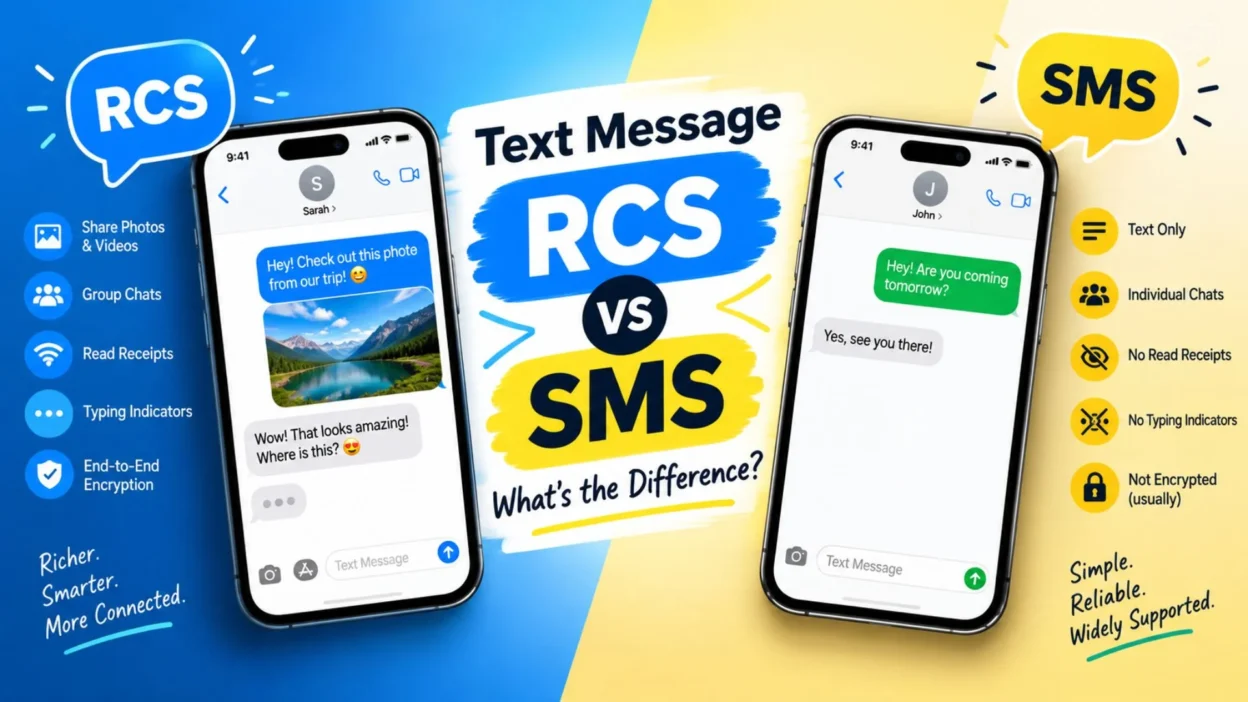
The easiest way to understand text message RCS vs SMS is to think of SMS as basic texting and RCS as enhanced texting.
- SMS focuses on plain text.
- RCS supports richer communication.
- SMS can work through cellular networks.
- RCS generally uses an internet connection.
- SMS has limited media capabilities.
- RCS offers better media sharing.
- SMS does not normally show typing indicators.
- RCS can show typing indicators.
- SMS does not have standard read receipts.
- RCS can provide read receipts.
- SMS has smaller message limitations.
- RCS can handle richer content.
- SMS has broader basic compatibility.
- RCS availability depends on support.
- Both are designed for everyday messaging.
RCS vs SMS: Feature Comparison
The features are where the difference becomes much easier to spot.
- SMS: Basic text messages.
- RCS: Rich text messaging.
- SMS: Limited media experience.
- RCS: Better photo and video sharing.
- SMS: No standard typing indicator.
- RCS: Typing indicators can be available.
- SMS: No standard read receipts.
- RCS: Read receipts can be available.
- SMS: Basic group messaging.
- RCS: More advanced group chat features.
- SMS: Smaller file support.
- RCS: Larger media support.
- SMS: Cellular-based delivery.
- RCS: Internet-based delivery.
- Both: Useful for everyday communication.
Does RCS Need the Internet?
Yes, RCS normally relies on an internet connection to provide its richer messaging features.
- RCS can use mobile data.
- RCS can also use Wi-Fi.
- Photos may use internet data.
- Videos may use internet data.
- Typing indicators require RCS connectivity.
- Read receipts depend on RCS communication.
- Group features may rely on data.
- A weak connection can affect RCS.
- Wi-Fi can help when cellular data is limited.
- Mobile data can keep RCS working away from Wi-Fi.
- RCS availability can vary by network.
- Messaging apps may handle connection changes differently.
- Some systems can fall back to SMS.
- Internet access improves the RCS experience.
- Basic SMS does not depend on mobile internet in the same way.
Does SMS Need the Internet?
No. Traditional SMS does not require mobile internet.
- SMS uses a cellular network.
- It can work when mobile data is turned off.
- You do not need Wi-Fi for SMS.
- Basic SMS can work with cellular service.
- SMS can be useful in low-data situations.
- It does not require an RCS connection.
- SMS is supported by many networks.
- It can work across different phone types.
- Internet apps are not required.
- Mobile data settings do not normally control SMS.
- SMS can be sent without Wi-Fi.
- It remains useful for simple communication.
- Network coverage is still required.
- A cellular connection helps deliver the message.
- SMS is built around basic mobile texting.
RCS vs SMS for Photos and Videos
Media sharing is one area where RCS can feel very different from traditional SMS.
- SMS has limited multimedia capabilities.
- MMS is often used for multimedia messaging.
- RCS can provide richer media sharing.
- RCS can support higher-quality photos.
- Videos can be easier to share through RCS.
- Large media can be handled better.
- RCS conversations can feel more like chat apps.
- Photo previews can look more modern.
- Media sharing depends on device support.
- Network support can affect RCS features.
- App settings can also matter.
- SMS is better suited to basic text.
- RCS is designed for richer conversations.
- Both can support everyday communication.
- Your phone may automatically choose the available method.
RCS vs SMS for Group Chats
Group conversations are another area where RCS can offer more modern features.
- SMS group chats are usually basic.
- MMS may handle some group messaging.
- RCS can provide richer group chat tools.
- Participants can receive typing indicators.
- Read receipts may be available.
- Message reactions may be supported.
- Media sharing can be easier.
- Group conversations can feel more interactive.
- Names and profiles may appear differently.
- Features depend on messaging software.
- Carrier support can affect group features.
- Device compatibility matters.
- An unsupported participant can change the experience.
- SMS remains useful for broad compatibility.
- RCS is built with modern group messaging in mind.
RCS vs SMS for Read Receipts
Read receipts tell you whether a message has been opened or read. This is common in modern chat apps but is not a standard SMS feature.
- SMS does not normally provide read receipts.
- RCS can support read receipts.
- The recipient may have read receipts enabled.
- The sender may also control the setting.
- Messaging apps can use different settings.
- Read receipts are not guaranteed with RCS.
- Network support can affect availability.
- Privacy settings may hide read status.
- Some users prefer read receipts.
- Others prefer more privacy.
- SMS keeps things simpler.
- RCS gives users more chat-style features.
- A read receipt does not guarantee a reply.
- Delivery and reading are different events.
- Settings can change what you see.
RCS vs SMS for Typing Indicators
Typing indicators can make a conversation feel much more like a live chat.
- RCS can show when someone is typing.
- SMS does not normally provide this feature.
- Typing indicators can appear while a reply is being written.
- They can make conversations feel more interactive.
- Users may see moving dots.
- The exact design depends on the messaging app.
- The feature requires RCS support.
- Internet connectivity is usually needed.
- Privacy settings may affect the feature.
- A non-RCS conversation may not show it.
- SMS remains focused on basic messages.
- RCS adds more real-time interaction.
- Typing indicators can reduce uncertainty.
- They can make waiting for a reply feel shorter.
- Sometimes those dots disappear because the person changed their mind. Technology understands suspense too.
RCS vs SMS for Message Reactions
Message reactions are another modern feature associated with richer messaging.
- RCS can support message reactions.
- SMS does not have standard built-in reactions.
- Users may react with emojis.
- Reactions can make conversations quicker.
- A reaction can replace a short reply.
- Different messaging apps may display reactions differently.
- Device compatibility matters.
- RCS support is needed for the richer experience.
- Some reactions may appear differently across systems.
- Messaging settings can affect the experience.
- Reactions are useful for group conversations.
- They can keep chats less cluttered.
- A thumbs-up can sometimes say enough.
- A laughing emoji can save several sentences.
- RCS brings texting closer to modern chat apps.
Is RCS More Secure Than SMS?
Security depends on the exact messaging setup, provider, and features being used. RCS is not simply one single security standard with identical protection everywhere.
- Traditional SMS is not end-to-end encrypted.
- Some RCS conversations can offer stronger privacy features.
- Encryption support depends on the implementation.
- Google Messages has offered end-to-end encryption for supported RCS chats.
- Not every RCS conversation necessarily has identical protection.
- Carrier and messaging app support can differ.
- Device compatibility can matter.
- Users should check their messaging settings.
- Private information deserves extra care.
- Security features can change over time.
- An RCS label does not automatically explain every security detail.
- SMS remains a basic communication system.
- RCS adds modern messaging capabilities.
- Privacy settings should be reviewed when important.
- Never assume every messaging service works exactly the same way.
Why Does My Phone Use RCS Sometimes and SMS Other Times?
Your phone may choose between RCS and SMS depending on compatibility and network conditions.
- The recipient may not support RCS.
- RCS may be disabled.
- Your internet connection may be unavailable.
- The messaging service may have a temporary issue.
- Carrier support can affect RCS.
- The recipient may have changed devices.
- Messaging settings can change the available option.
- The conversation may switch to SMS automatically.
- Your phone may use SMS as a fallback.
- Group chats can behave differently.
- Software updates may change messaging behavior.
- A temporary connection problem can matter.
- RCS registration may need to complete.
- Both users may need compatible messaging support.
- The message type shown by your app can explain the switch.
Why Did My RCS Message Change to SMS?
Seeing an RCS conversation switch to SMS can be confusing, but it does not always mean something is wrong.
- The recipient may have lost internet access.
- Your own connection may be unavailable.
- RCS service may be temporarily unavailable.
- The recipient may have turned RCS off.
- Your phone may not be registered for RCS.
- Carrier support can change.
- The messaging app may switch automatically.
- Software settings may affect the conversation.
- The recipient may have changed phones.
- A temporary service problem may occur.
- Group participants can affect compatibility.
- Your phone may use SMS as a fallback.
- Restarting the messaging app can sometimes help.
- Checking RCS settings may explain the change.
- The message label can tell you which system is being used.
How to Check If You Are Using RCS
Most supported messaging apps make it fairly easy to identify an RCS conversation.
- Open your messaging app.
- Start a conversation with a contact.
- Look near the message box.
- You may see an RCS-related label.
- Some apps show “RCS message.”
- Others may display different wording.
- Check your messaging settings.
- Look for chat features.
- Confirm that RCS is enabled.
- Check your internet connection.
- Ask the recipient whether RCS is enabled.
- Try sending a test message.
- Look for typing indicators.
- Check whether read receipts are available.
- Remember that app designs vary.
How to Turn RCS On or Off
The exact steps depend on your phone and messaging app.
- Open your messaging application.
- Go to its settings.
- Look for RCS or chat settings.
- Find the option for chat features.
- Check whether RCS is enabled.
- Review your phone number status.
- Make sure internet access is available.
- Read the privacy options.
- Check read receipt settings.
- Check typing indicator settings.
- Update your messaging app if needed.
- Restart the app after changing settings.
- Some devices may use different menus.
- Carrier support can affect the options.
- Avoid changing settings repeatedly if registration is still processing.
RCS vs SMS for Businesses
Businesses can use both technologies for customer communication, but they serve different purposes.
- SMS has broad reach.
- RCS can provide richer conversations.
- SMS is useful for basic alerts.
- Appointment reminders can use SMS.
- RCS can add images and richer content.
- Businesses can create more interactive messages with supported RCS solutions.
- Branding can be more prominent with RCS.
- Rich media can improve the presentation.
- Availability varies by market and provider.
- Not every customer will have RCS.
- SMS can remain an important fallback.
- Businesses should consider device compatibility.
- Message costs depend on the provider and plan.
- Customer preferences should be respected.
- The best setup may use more than one messaging channel.
RCS vs SMS for Everyday Users
For normal conversations, the choice may happen automatically.
- SMS is simple.
- RCS feels more like a chat app.
- SMS works with broad basic compatibility.
- RCS provides richer features.
- SMS is useful for quick text.
- RCS is useful for media-heavy chats.
- SMS can work without mobile internet.
- RCS normally needs internet connectivity.
- SMS has fewer interactive features.
- RCS can offer reactions.
- RCS can offer typing indicators.
- RCS can offer read receipts.
- Both can send everyday messages.
- Your phone may switch between them.
- You usually do not need to manually choose every time.
Common RCS and SMS Mistakes
A few simple misunderstandings can make texting more confusing than it needs to be.
- Assuming every phone supports RCS.
- Thinking RCS always requires the same app.
- Assuming SMS needs Wi-Fi.
- Confusing SMS with RCS.
- Assuming every RCS chat has identical features.
- Treating read receipts as guaranteed.
- Assuming typing indicators always appear.
- Forgetting that carrier support matters.
- Ignoring messaging app settings.
- Assuming a failed RCS message means the recipient blocked you.
- Confusing delivery with reading.
- Expecting every photo to have identical quality.
- Forgetting that group chats can behave differently.
- Assuming RCS settings are identical on every phone.
- Thinking a switch to SMS always indicates a serious problem.
RCS vs SMS: Quick Pros and Cons
A simple pros-and-cons view can make the difference easier to remember.
- SMS: Works across a very wide range of phones.
- SMS: Simple to understand.
- SMS: Does not require mobile internet.
- SMS: Useful for basic alerts.
- SMS: Has limited interactive features.
- SMS: Offers less rich media support.
- RCS: Provides richer messaging.
- RCS: Can support read receipts.
- RCS: Can support typing indicators.
- RCS: Can support message reactions.
- RCS: Offers improved media sharing.
- RCS: Requires compatible support for its richer features.
- RCS: Usually relies on internet connectivity.
- RCS: Availability can vary.
- Both: Can be useful depending on the situation.
Text Message RCS vs SMS: Which One Should You Use?
There is no need to overthink it. Your phone will often choose the available messaging method automatically.
- Use SMS when basic compatibility matters.
- Use RCS for richer conversations when supported.
- Choose RCS for supported media-heavy chats.
- Use SMS when internet access is unavailable.
- RCS works well for interactive conversations.
- SMS remains useful for simple communication.
- RCS can make group chats more engaging.
- SMS can be helpful for basic notifications.
- Check your phone settings if RCS is unavailable.
- Keep your messaging app updated.
- Confirm network support when troubleshooting.
- Check whether the recipient supports RCS.
- Let automatic fallback handle unsupported situations.
- Consider privacy settings for both systems.
- Pick the option that matches your communication needs.
Text Message RCS vs SMS: Easy Example
Imagine you send the same message to a friend using each system. The difference becomes easier to understand.
- SMS: “Hey, are you free tonight?”
- RCS: “Hey, are you free tonight?” plus richer chat features.
- SMS: The message is mainly plain text.
- RCS: The conversation can show typing activity.
- SMS: Read status is not a standard feature.
- RCS: Read receipts may appear.
- SMS: Media options are more limited.
- RCS: Richer photo sharing is possible.
- SMS: Group chats can be basic.
- RCS: Group conversations can offer more tools.
- SMS: Cellular service handles delivery.
- RCS: Internet connectivity supports the chat.
- SMS: Broad basic compatibility is a key strength.
- RCS: Modern chat features are a key strength.
- Both: The goal is still simple—help people communicate.
FAQs
Is RCS better than SMS?
RCS offers more modern messaging features, while SMS offers broad basic compatibility. The useful option depends on the phone, network, and features you need.
Does RCS cost money?
RCS normally uses an internet connection, so data usage may apply according to your mobile plan. Carrier and messaging service policies can vary.
Can I send an RCS message to someone without RCS?
In many messaging systems, the conversation may fall back to SMS or another supported messaging method when RCS is unavailable.
Why does my message say SMS instead of RCS?
RCS may be unavailable because of internet access, settings, registration, recipient compatibility, carrier support, or a temporary service issue.
Can RCS send pictures?
Yes. RCS is designed to support richer media sharing, including photos and other content, when the relevant devices and services support it.
Conclusion
Understanding text message RCS vs SMS is easier once you know the main difference. SMS is the classic, simple texting system, while RCS adds richer chat features such as media sharing, typing indicators, reactions, and read receipts when supported.
Your phone may switch between the two based on compatibility, settings, and connectivity. So, if you see RCS one moment and SMS the next, there may be a perfectly normal reason.
Found this guide useful? Share it with a friend who keeps asking, “Why did my text change to SMS?” You can also save this page for the next time your messaging app decides to become mysterious.

Muhammad Shahroz is a passionate writer who creates helpful content about messages and word meanings. He is committed to providing clear, accurate, and easy-to-understand information on TextsMessagez.com.